Before you even think about writing that "I'm excited to announce…" post, there are a few housekeeping items to take care of on your LinkedIn profile. Getting these right is the difference between a polished, professional announcement and one that feels rushed and a bit clumsy.
Let's walk through the prep work that sets you up for a great reception.
Setting the Stage for Your Big Announcement
Broadcasting your new role is more than just an update; it's a strategic career move. A little groundwork beforehand ensures your announcement lands with the impact it deserves. Rushing to hit 'post' can make the whole thing feel disjointed.
Think of it this way: your announcement post is the headline, but your profile is the full story. When people see your news, their first instinct is often to click through to your profile. You want that story to be consistent, complete, and compelling from the get-go.
First, Update Your Experience Section
This is non-negotiable. Before you write a single word of your announcement post, add your new role to the 'Experience' section of your profile.
Why is this so critical? It's all about credibility and a seamless user experience. Imagine an old colleague or a potential new contact seeing your post, clicking on your profile out of curiosity, and finding no mention of this new job. It creates confusion and looks unprofessional.
Get your new title, the company, and a solid description of your responsibilities locked in first. This simple step makes your announcement official.
Clarify the Goal of Your Post
Okay, with your profile updated, take a minute to think: what's the primary goal here? Knowing your "why" will guide the entire tone and content of your post. Are you trying to:
- Express Gratitude? Maybe your main focus is to thank your previous team, managers, and mentors, closing that chapter on a high note.
- Show Excitement? You might want to channel all your energy into your new company, its mission, and the challenges you're ready to dive into.
- Simply Inform Your Network? Sometimes, the goal is just a straightforward update to keep your professional circle in the loop about your career path.
Defining your main goal—whether it's gratitude, excitement, or a simple update—is the key. It helps you craft a message that feels authentic and focused, not generic.
Check Your Privacy Settings
This is a quick, but crucial, final check. You've done the prep work, and now you need to make sure people will actually see it.
Dive into your 'Settings & Privacy' to review who can see your profile updates and posts. For a new job announcement, you almost always want this visible to 'Everyone' on LinkedIn. This maximises its reach, allowing your entire professional network—and beyond—to see your news and celebrate with you. Getting this wrong means your big announcement might only go out to a small fraction of your connections.
Choosing the Right Way to Share Your News
Alright, so your profile is looking sharp and you're ready to make the big announcement. Now comes a crucial decision: how exactly do you share your new job on LinkedIn? You’ve got a few options, and the one you pick really shapes how your news lands with your network.
Think of it this way: you can either craft a personal, thoughtful message or you can let LinkedIn’s automated feature do the heavy lifting. One gives you complete creative freedom, while the other is fast but generic. Neither is wrong, but they serve very different purposes.
Before you even think about posting, there are a few housekeeping steps to take care of. Getting these right sets the stage for a much more effective announcement.
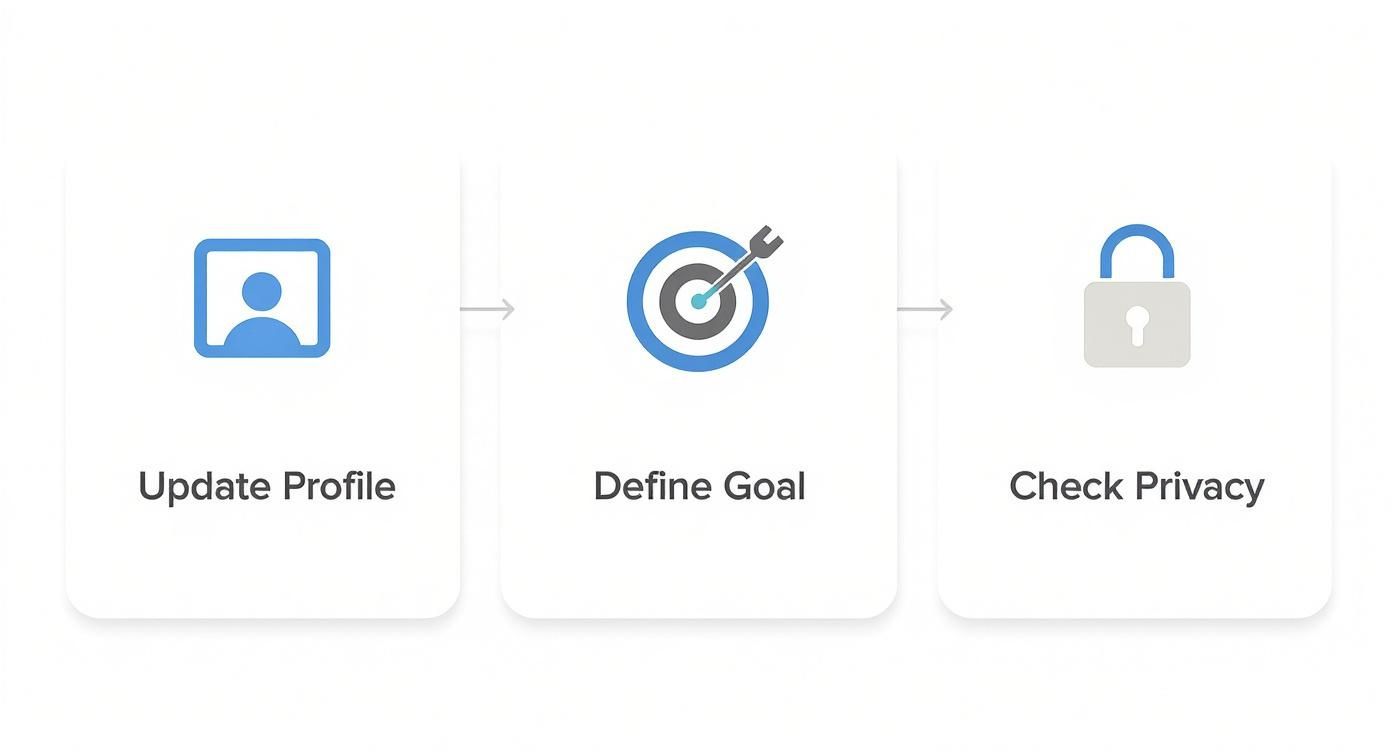
As you can see, it all starts with your own profile. A successful post is built on solid groundwork: updating your details, knowing what you want to achieve, and checking your settings.
To help you decide which path to take, let's break down the three main ways you can announce your new role.
Comparing LinkedIn Announcement Methods
Each method for sharing your new job has its own strengths and is suited for different situations. This table gives you a quick side-by-side comparison to help you choose the best fit for your specific goals.
| Method | Best For | Key Benefit | Potential Drawback |
|---|---|---|---|
| Standard Post | Storytelling, expressing gratitude, and maximising engagement. | Full creative control over text, visuals, and tagging. | Requires more thought and effort to write well. |
| Automatic Job Update | A quick, no-fuss announcement when you're short on time. | Simple and fast; just a single click. | Impersonal and easily missed in a busy feed. |
| LinkedIn Article | Significant career moves, leadership roles, or sharing deep insights. | Establishes thought leadership and creates lasting content. | Can be overkill for a standard job change. |
Ultimately, a handcrafted post usually gives you the most bang for your buck in terms of engagement, but the other options are there for a reason and can be the right choice depending on your circumstances.
The Standard Post: Adding a Personal Touch
This is, by far, the most popular and flexible route. Writing a standard post lets you frame the announcement on your own terms. You get to tell a little story, thank your previous team, and express genuine excitement for what's next. It’s also where you can add a great photo or a branded image to grab attention.
This is your best bet if you want to connect with people on a personal level. It’s the perfect format for sharing what this new role means to you, which naturally encourages more meaningful comments and conversations from your network.
Your announcement is a prime networking opportunity. A well-crafted personal post can spark conversations that lead to new connections and rekindle old ones, making it much more than just a simple update.
The Automatic Job Update: Quick and Simple
When you add a new position to the "Experience" section of your profile, LinkedIn helpfully asks if you want to share the update with your network. If you click yes, it generates a standardised notification that goes out into the feed.
This is the low-effort option. It’s perfect if you’re pressed for time or just prefer to keep things low-key. It gets the job done.
The trade-off, however, is that it lacks any personality. It simply states the fact of your job change without any context or emotion, so it rarely sparks the kind of engagement a personal post does. It informs, but it doesn't connect.
The LinkedIn Article: The Deep Dive
For those moments that represent a major career milestone—a big promotion, a move into the C-suite, or a pivot to a new industry—a LinkedIn Article can be incredibly powerful. Think of it as a blog post that lives directly on your profile.
Choose this format when you have a real story to tell. You can go into detail about your journey, share lessons you've learned along the way, or lay out your vision for this new chapter. It’s a fantastic way to position yourself as a thoughtful leader in your field. The only catch? It takes significantly more time and effort, and it might feel like a bit much for a more straightforward job change.
Crafting an Unforgettable Announcement Post
This is where the magic happens. Your announcement isn't just a status update; it's a story. A well-written post does more than state a fact—it builds your personal brand, celebrates your career journey, and gets people talking. Let's ditch the generic templates and create something that actually sounds like you.
Your first line is your digital handshake. It has to be strong enough to stop the scroll. Forget the tired "Happy to announce…" and lead with the real emotion behind the move.
The structure of your post is just as crucial as the words you choose. You want to make your news easy to digest and impactful.
The Anatomy of a Great Post
A truly memorable announcement gracefully weaves together your past, present, and future. I always think of it in three parts: saying thanks for where you've been, celebrating where you are, and showing genuine excitement for what’s next.
- The Look Back: Give a nod to your previous company and colleagues. A simple, heartfelt "thank you" for the lessons and shared experiences goes a long way. It’s all about maintaining those professional relationships.
- The Big News: State your new role and the company you’re joining. Be clear and confident—this is the core of your announcement.
- The Look Forward: Share what you’re genuinely excited about. Is it the company’s mission? A specific project? The chance to learn a new skill? This adds personality and shows you’re ready to hit the ground running.
Your announcement is a prime opportunity to demonstrate professionalism and emotional intelligence. By graciously thanking your past team, you build a bridge instead of burning one, which is always a smart career move.
Finding Your Authentic Voice
The best posts feel personal, not like they were written by a robot. Your industry and personality should absolutely shine through. A software developer's post will naturally sound different from a creative director's—and that's a good thing.
For the Tech Professional:
"Thrilled to share that I'm joining the incredible engineering team at @InnovateTech as a Senior Cloud Architect! I'm looking forward to diving deep into scalable infrastructure and contributing to a product I've long admired. A huge thank you to my former colleagues at @DataCorp for three amazing years of growth and collaboration."
For the Creative Professional:
"Some personal news! I’m absolutely buzzing to start my next chapter as the new Art Director at @CreativeVisionsAgency. I can't wait to collaborate with this talented team and create work that truly inspires. Feeling immense gratitude for the journey at @DesignStudio and everyone who was part of it."
These are just a starting point, of course. To dive deeper into creating engaging content, check out our guide on crafting the perfect https://trustypost.ai/blog/linkedin-post/.
The Power of Visuals
Never, ever underestimate the impact of a good image. Posts with visuals get so much more engagement, and your announcement is the perfect time to use one.
- A Professional Headshot: A sharp, recent photo of yourself adds a personal touch. It literally puts a face to the news.
- Company Branding: Using your new company's logo or a branded graphic is another clean, professional option that looks great in the feed.
To make sure your post really stands out, you could even consider using AI-generated headshots for LinkedIn for a quick and polished update. It’s a small detail, but in a busy feed, it makes a massive difference in helping you make that fantastic first impression.
Making Your Announcement Seen: Tags, Hashtags, and Timing
Writing a great announcement is just the first step. Now, you need to make sure the right people actually see it. This is where a little strategy goes a long way. By thoughtfully using tags and hashtags and posting at the right moment, you can turn a simple update into a networking powerhouse.
The goal isn't just to blast your news everywhere. It's about getting your post in front of former colleagues, new teammates, and industry peers who will genuinely care. Get this right, and you'll not only get a flood of congratulations but also open doors for future opportunities.
Who Should You Tag?
Tagging isn't just a digital shout-out; it's how you bring people and organisations directly into your announcement. When you tag someone, your post gets a chance to appear on their network's feeds, massively expanding its audience.
As a rule of thumb, always tag your new company and your previous one. It’s professional courtesy, and it connects your update to their company pages, making you visible to their followers.
But don't stop there. Think about the people who made a real impact.
- A mentor or a great former manager: A quick, genuine thank you is a classy move that keeps that professional relationship strong.
- Your new boss or a key teammate: Tagging them shows you're eager to get started and helps build that initial rapport.
My advice? Make every tag count. Don't just tag people for the sake of it—that can come across as desperate for engagement. A specific, heartfelt mention like, "A huge thank you to @JaneDoe for being an incredible mentor these past two years," feels authentic and really strengthens that connection.
How to Use Hashtags Effectively
Hashtags are your post's navigation system. They tell the LinkedIn algorithm what your content is about, helping it get in front of users interested in those topics. The sweet spot is usually a mix of 3-5 hashtags—enough to give your post context without looking cluttered.
I recommend a blend of broad and niche tags. Start with the basics, then get specific.
- General Career Tags: Think
#NewRole,#CareerGrowth,#NewJob, or#PersonalDevelopment. - Industry-Specific Tags: This is where you target your peers. Use tags like
#FinTech,#DigitalMarketing,#SoftwareEngineering, or#HealthcareManagement. - Company Tags: If your new workplace has a branded hashtag, like
#LifeAt[CompanyName], definitely throw that in.
This combination casts a wide net while also zeroing in on the professionals in your field. If you really want to dig into getting your post seen, it's worth exploring more strategies for maximizing LinkedIn reach and profile views.
Getting the Timing Just Right
When you share your news is almost as crucial as what you share. Posting when your network is most active gives your announcement that initial boost it needs to catch the algorithm's attention. For most professionals, this means sometime during business hours on a weekday.
Let’s look at some numbers from Germany, for instance. Around 72% of people share their new job news on their first day, and over 80% do it on a Monday or Tuesday. The results are impressive, with an average of 45 profile views and 12 direct messages hitting their inbox in the first 24 hours.
While these stats are a great starting point, remember that every network is unique. Your connections might be early birds or night owls. To get a better sense of your specific audience's habits, you might want to learn more about the absolute best time to post on LinkedIn. Fine-tuning your timing ensures your big news lands at the top of the feed where it belongs.
Keep the Conversation Going After You Post

Your work isn't done the moment you hit 'post'. Far from it. That initial 24-hour window is your golden hour for engagement. This is when the LinkedIn algorithm is most interested in your content, and your active participation is what keeps the momentum going.
Think of it this way: your post is the party invitation, but the real networking happens when the guests arrive. Leaving comments unanswered is like turning your back on people who’ve shown up to celebrate with you. By monitoring and responding, you show you value their support and turn a one-way announcement into a lively conversation.
Responding with Purpose
As the congratulations and well-wishes start to pour in, resist the urge to simply 'like' every comment and move on. A thoughtful, personalised reply can do wonders for rekindling a professional relationship or cementing a new one.
Instead of a blanket "Thanks!", add a personal touch that shows you're paying attention.
- For a former colleague: "Thanks so much, [Name]! That means a lot coming from you. I'll always value the work we did on the [Project Name] project."
- For a new teammate: "Thank you, [Name]! I'm really looking forward to collaborating with you and the rest of the team."
- For a casual acquaintance: "Appreciate the kind words! Hope all is well with you. We should catch up sometime."
Each comment is a doorway to a deeper connection. Turning a simple 'congrats' into a brief, personalised exchange reinforces your professional relationships and keeps you top-of-mind.
Capitalising on Increased Profile Views
An announcement like this will almost certainly cause a spike in your profile views. Don't dismiss this as a vanity metric; it's a powerful signal of interest from your network and beyond. This surge in attention has a very real impact. For instance, a 2025 report by LinkedIn noted that over 85% of Fortune 1000 companies in Germany use LinkedIn Recruiter to find candidates, often starting with people who have just announced a new role. You can discover more insights about LinkedIn's role in German recruitment.
Now is the time to be proactive. Check out who's been viewing your profile. If you see relevant people who aren't yet in your network, consider sending them a connection request.
A simple, non-pushy message can open new doors:
"Hi [Name], thanks for stopping by my profile. I noticed we're both in the [Your Industry] space and thought it would be great to connect and learn more about your work."
This simple act turns passive viewers into active connections. For more strategies on expanding your professional circle, our guide on how to grow on LinkedIn is packed with useful tips. By thoughtfully engaging with comments and making the most of your profile views, your new job announcement will deliver networking value long after the initial buzz has faded.
A Few Common Questions About New Job Posts
Making a job announcement on LinkedIn can feel a bit like walking a tightrope. You're excited, but you also want to get the timing, tone, and etiquette just right. Let's tackle some of the most frequent questions that pop up.
How Should I Post If I Left My Last Job on Bad Terms?
My best advice? Keep it 100% positive and focus entirely on the future. Your announcement is a celebration of your next chapter, not a review of the last one. There’s absolutely no reason to bring up your previous employer or any negative experiences.
Just channel your genuine excitement for the new role and the company you're joining. A simple thank you to your network for their support along the way is always a nice touch. In the professional world, taking the high road is non-negotiable—it protects your reputation and keeps the focus where it belongs: on your bright future.
How Soon Should I Announce My New Job?
This is a big one. It's tempting to shout it from the rooftops the moment you sign the offer letter, but hold off. The most professional and safest bet is to wait until after you've completed your first day, or even better, your first full week.
Why wait? It confirms everything is truly official. Sometimes start dates get pushed back, or unforeseen things happen. Waiting until you’re actually settled in your new role avoids any potential for an awkward "retraction" post and ensures your announcement is rock-solid.
It's a classic rookie mistake to post as soon as you accept an offer. The gold standard is waiting until your first week is in the books. It shows good judgement and makes sure all the i's are dotted and t's are crossed before you go public.
Can I Stop My Current Boss from Seeing My Job Update?
In a word, no. LinkedIn doesn't have a feature that lets you hide a post from specific connections. Once you hit "Post," anyone you're connected to, including your current boss and colleagues, can potentially see it in their feed.
This is exactly why you should never, ever post about a new job before you've officially resigned and your departure is known within your current company. Announcing it prematurely is one of the fastest ways to burn a bridge and create a deeply uncomfortable situation for yourself and your team. Be respectful of the process and your employer by waiting for the right moment.
What if My Announcement Doesn't Get Many Likes?
Honestly? Don't sweat the vanity metrics. The real purpose of a new job post is to inform your professional network about your career move, not to chase viral fame. The like count has zero bearing on the success of your announcement.
As long as the important people—your old colleagues, your new team, mentors, and key industry contacts—are aware of your move, the post has served its purpose. The true value is in keeping your network updated and maintaining those relationships, not in how many thumbs-ups it gets.
Feeling like you're on a content treadmill for your personal brand or business? Trustypost is an AI-powered ghostwriter that figures out your unique voice and serves up daily, on-brand post ideas in minutes. Give the free 7-day trial a go and see how easy social media can be.