Using LinkedIn for marketing isn't just about posting updates. It's about building a solid foundation first—through a polished profile and Company Page—then creating content that actually speaks to other professionals, and finally, engaging with your network to build real relationships.
The goal is to stop thinking of LinkedIn as a digital CV and start treating it like a 24/7 lead-generation machine that runs on the value you consistently provide.
Build a Powerful LinkedIn Foundation
Before you even think about content or ads, you need to get your own house in order. So many professionals and businesses treat their LinkedIn presence as an afterthought, like a digital business card left to gather dust. This is a huge mistake. Your foundation isn't just about "being on LinkedIn"; it's about building a digital storefront that pulls in the right people, keeps them engaged, and turns them into clients or partners.
Think of it this way: your personal profile and your Company Page are two sides of the same coin. They work together but serve different purposes. Your personal profile is where you connect with people, share your unique take on things, and become a trusted expert. It’s all about personality. Your Company Page, on the other hand, is your brand’s official headquarters—a spot for company news, branded content, and social proof.
To really make LinkedIn work for your marketing, both need to be firing on all cylinders.
Optimise Your Personal Profile for Discovery
Your personal profile is often the first handshake. It needs to pass the five-second test: can someone glance at it and immediately understand what you do, who you help, and why they should care?
Here’s what you need to nail:
- Professional Headshot: A clear, high-quality photo of you—and only you—looking friendly and professional. No company logos, no holiday snaps.
- Strategic Headline: Don’t just put your job title. This is prime real estate for keywords. Instead of "Marketing Manager," try something like "B2B Content Strategist | Helping SaaS Companies Drive Qualified Leads." It instantly tells people what you do.
- Compelling Summary (About Section): This is your chance to tell a story. Who are you? What problems do you love to solve? Write in the first person and end with a clear call-to-action, like an invitation to connect or a link to your website.
- Featured Section: Think of this as your personal highlight reel. Pin your best-performing posts, a link to your portfolio, glowing client testimonials, or a useful freebie. It's a fantastic visual shortcut to showcase your value.
Construct an Authoritative Company Page
Okay, so personal profiles get more organic reach, but your Company Page is what makes your business look legitimate. It’s where people go to check you out. A neglected page screams "inactive" or "unprofessional." For a complete walkthrough, check out our guide on how to create a standout business page on LinkedIn.
Having a solid Company Page is non-negotiable, especially in B2B. Just look at the German market, where LinkedIn has become an essential tool. The user base is expected to hit 23.5 million by October 2025, which is 28.8% of the entire country's population. With an ad reach of 21 million members—mostly professionals aged 25 to 34—it's a goldmine for targeted campaigns.
This simple flow chart shows how it all fits together: a strong personal profile, a credible Company Page, and valuable content all work in harmony.
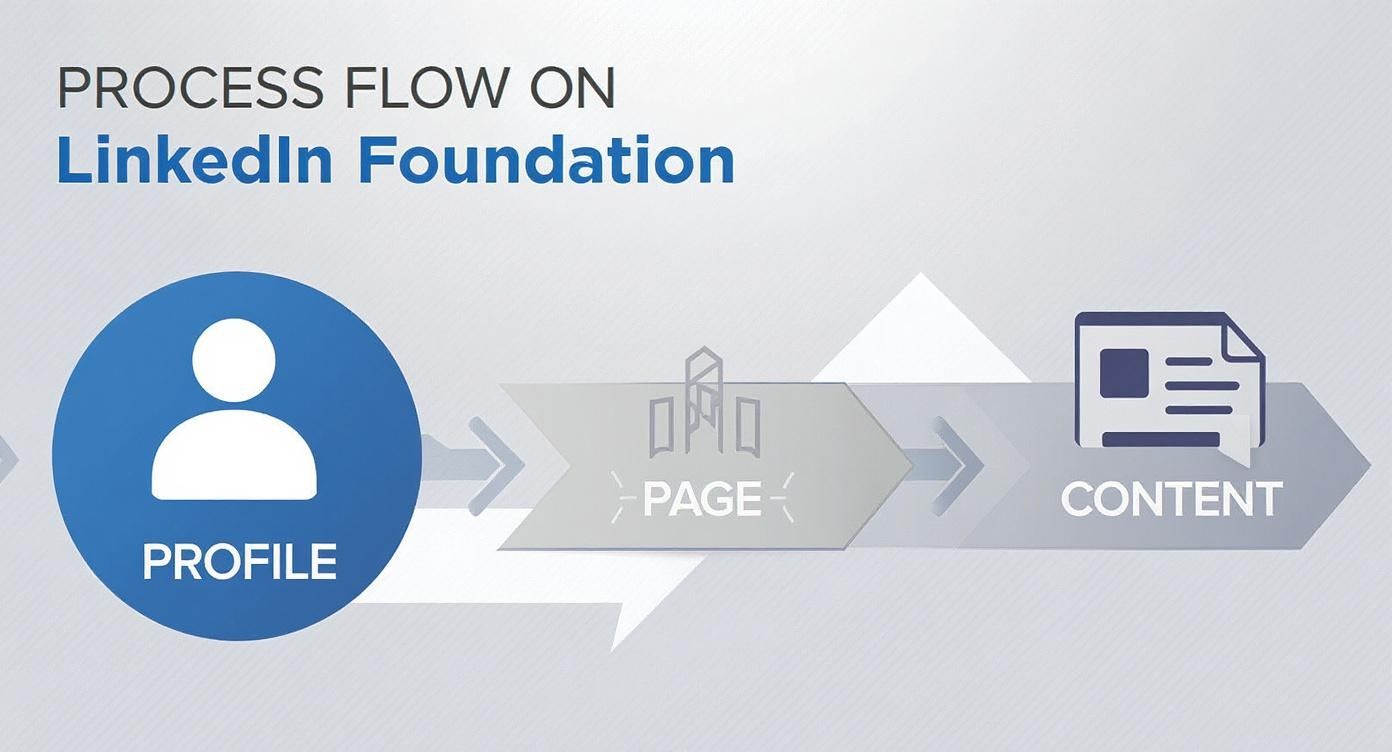
The point is, these pieces aren't separate. They feed into each other and build momentum for everything else you do.
Key Takeaway: Your LinkedIn foundation is a two-part engine. Your personal profile builds human connection and trust, while your Company Page establishes brand authority and credibility. Both must be actively managed and optimised to work together effectively. Without a solid foundation, even the best content or ad campaigns will fall flat.
Create Content That Connects and Converts
Think of your optimised profile as a well-designed shop front. It looks great, but if the products inside are dull, no one's coming in. Your content is the lifeblood of your LinkedIn strategy—it’s how you demonstrate what you know, build genuine trust, and kick off the conversations that actually lead to business.
On LinkedIn, you’re not chasing viral trends. You’re aiming for something more sustainable: consistently providing real value to a professional audience that’s short on time and has high expectations. The goal is to stop the scroll, not with gimmicks, but with a genuinely useful insight.
It’s a simple mindset shift from, "What can I post today?" to "What problem can I solve for my audience today?"
Mastering Platform-Native Content Formats
LinkedIn's algorithm has a clear preference: it rewards content that keeps people on the platform. While sharing a link to your latest blog post is okay now and then, focusing on native formats—content you create directly on LinkedIn—will almost always get you better organic reach.
A good content mix keeps your feed fresh and appeals to different people. It's like a balanced diet for your audience; you need a bit of everything to keep them healthy and engaged.
Here are the key formats you'll want to get comfortable with:
- Text-Only Posts: Never underestimate the power of a well-told story or a sharp, concise insight. These are brilliant for sharing personal experiences, tough lessons learned, or just posing a question that gets people thinking.
- Image Posts: The right visual can make your words hit harder. Use images to illustrate data, pull out a key quote, or give a behind-the-scenes peek at your work.
- Carousels (PDFs): Right now, these are one of the most powerful formats for educational content. By uploading a PDF, you create a swipeable document that's perfect for breaking down a complex idea into bite-sized steps, sharing a handy checklist, or walking through a mini case study.
- Native Video: Short, authentic videos (think 1-2 minutes) tend to do incredibly well. We're not talking about big corporate productions here; think more along the lines of helpful advice shared directly from your desk.
- Polls: This is the easiest way to spark instant engagement and get some quick market research done. Use them to ask about common industry hurdles, software preferences, or what topics your audience wants you to cover next.
Pro Tip: The real secret to great LinkedIn content is generosity. Before you publish, ask yourself one question: "Does this post teach, inspire, entertain, or start a meaningful conversation?" If the answer is no, it's probably not ready.
To help you decide what to create, here’s a quick overview of how different formats perform and where they shine.
LinkedIn Content Format Performance Overview
| Content Format | Best For | Key Engagement Driver | Pro Tip |
|---|---|---|---|
| Text-Only Posts | Storytelling, posing questions, sharing quick insights | Relatability and sparking conversation in the comments | Use short paragraphs and lots of white space to make it easy to read on mobile. |
| Image Posts | Showcasing data, highlighting quotes, announcements | Visual appeal that stops the scroll | Ensure the image is high-quality and directly supports the message in your text. Avoid generic stock photos. |
| Carousels (PDFs) | In-depth guides, step-by-step tutorials, case studies | High value and "swipe-through" interactivity | Design a compelling cover slide. Each slide should make the reader want to see the next one. |
| Native Video | Building personal connection, product demos, tutorials | Authenticity and direct-to-camera engagement | Add captions! Most users watch videos with the sound off. Keep it concise and get to the point quickly. |
| Polls | Gathering audience feedback, quick engagement | Low-effort participation | Offer clear, distinct options and always follow up in the comments with your own take on the results. |
Ultimately, the best format is the one that delivers your message most effectively. Don't be afraid to experiment to see what resonates most with your specific audience.
The Anatomy of a High-Performing Post
A post that gets real traction isn't just a good idea thrown out into the void. The way you structure it is just as important for grabbing—and holding—attention in a crowded feed.
Every successful post has three parts that work in harmony. First, a hook that stops the scroll. Second, a body that delivers value clearly. And finally, a call-to-action that tells people what to do next.
Let's break down how to get each part right.
Crafting an Irresistible Hook
You have about two seconds. That’s it. The first line or two is all anyone sees before they have to click "…see more," making your hook the most critical piece of your entire post.
Here are a few hook formulas that consistently work:
- The Bold Statement: Start with a contrarian opinion. (e.g., "Your content strategy is failing for one simple reason.")
- The Question: Ask something your target audience is already wrestling with. (e.g., "Struggling to find qualified leads on LinkedIn?")
- The Story Starter: Drop the reader right into the middle of a story. (e.g., "Last week, I made a mistake that cost us a potential client.")
Structuring for Readability
Nobody wants to decipher a wall of text on their phone. Smart formatting makes your posts easy to scan and digest.
- Keep sentences and paragraphs short. Aim for one main idea per paragraph.
- Embrace white space. Use line breaks to separate your thoughts visually.
- Use bullet points or numbered lists to lay out information clearly.
- Add emojis strategically for a touch of personality and to break up the text.
For a much deeper dive, check out our guide on crafting the perfect LinkedIn post. It’s full of practical templates and examples you can use right away.
The data backs this up, especially in markets like Germany. Across the EMEA region, sponsored updates on LinkedIn see a 4.05% conversion rate—far higher than many other platforms. Even better, people are more willing to interact, with the average engagement rate for posts in Europe climbing by 22%. You can find more of these insights about LinkedIn engagement by region on contentin.io.
This just goes to show that a professional audience is ready and waiting to engage with quality content, making your efforts here a seriously high-return activity when you get it right.
Grow and Engage Your Professional Network
You’ve got a polished profile and you’re sharing quality content. That’s a fantastic start, but now it’s time to get that content in front of the right people. Having a massive network is pointless if it’s just a list of names; the real magic happens when you cultivate a community of professionals who actually know, like, and trust you.
This is where your marketing shifts from broadcasting to genuine connection. Your aim isn't just to rack up followers. It's about building relationships that can turn into real business opportunities, and that requires a thoughtful, human approach—not just firing off generic connection requests.
True engagement means getting off the sidelines. You have to move beyond a passive "like" and become an active voice in the conversations happening across your industry.
Connect With Intention
Sending that default, empty connection request is the quickest way to get ignored. It screams low effort and gives the other person zero reason to click "Accept." If you want to build a network that actually means something, every request needs to be strategic and personal.
Before you hit that "Connect" button, take a second and ask yourself why you want to connect with this person. Is it a potential client? An industry peer you admire? Someone you saw speak at a virtual event? Knowing your "why" makes personalising the request a breeze.
Here’s a simple, effective way to frame a connection request that actually works:
- Provide Context: Briefly mention how you came across their profile or what you have in common. "I saw your fantastic comment on [Influencer]'s post about B2B marketing…"
- Give a Specific Compliment: Point out something specific about their work that impressed you. "…and your point about content distribution really resonated with me."
- State Your Purpose: Explain clearly why you want to connect. "I'm always keen to connect with other marketing leaders in the SaaS space and would love to follow your work."
This small bit of effort transforms a cold outreach into a warm introduction. It will dramatically boost your acceptance rate and lay the groundwork for a proper professional relationship.
Go from Follower to Valued Voice
Posting great content is only half the job. To truly build authority and get noticed, you have to become an active participant in your network's conversations. That means setting aside time to leave thoughtful comments on other people's posts.
Think of it as digital networking. When you show up in the comments of a popular post, you’re putting your name, photo, and headline in front of a highly relevant audience. A smart, insightful comment can often drive more profile views and connection requests than one of your own posts.
Key Takeaway: Your comments are content. Treat each one as a mini-billboard for your expertise and personality. Ditch the generic "Great post!" replies and instead, add to the conversation, ask a clarifying question, or offer a unique perspective.
Find Your Community in LinkedIn Groups
I’ll be honest, some LinkedIn Groups can be noisy and full of spam. But the right ones are absolute goldmines for connecting with your target audience where they’re already gathering. The trick is to find active, well-moderated groups that are directly relevant to your industry or the clients you want to serve.
Once you’re in, resist the urge to immediately drop links to your own content. That’s a surefire way to get ignored or even kicked out. Instead, lead with value:
- Listen first: Spend a week just reading the discussions. Get a feel for the group's culture, common pain points, and who the key players are.
- Answer questions: Position yourself as the helpful expert. Provide clear, actionable answers when other members are looking for help.
- Share resources: Post helpful third-party articles or insights that genuinely benefit the community, without any self-promotion.
By becoming a known, helpful member of the group, you build immense trust and credibility. When you eventually do share your own content or mention your services, people will be far more receptive because you’ve already proven you’re there to contribute, not just to sell. This is how you build relationships that last.
Put Some Budget Behind It: LinkedIn Ads and Lead Gen
Creating great organic content is your baseline for building trust and authority, but let's be realistic—it can only take you so far. If you want a predictable stream of high-quality leads, you need to layer in a smart paid strategy. This is where LinkedIn Ads come in, letting you get your message right in front of the decision-makers you need to reach.
Think about it. On other platforms, your ads are competing with holiday photos and cat videos. But on LinkedIn, people are in a business mindset. They’re there to network, learn, and find solutions. That professional context is why a staggering 96% of B2B marketers see LinkedIn as their top choice for lead generation.
The real magic of LinkedIn Ads isn’t just about getting seen; it’s about getting seen by the right people. The platform allows you to target professionals based on criteria that actually matter for business.
Get Hyper-Specific With Your Ad Targeting
The level of detail you can get with targeting in the LinkedIn Campaign Manager is incredible. Forget casting a wide net and hoping for the best. Here, you can pinpoint the exact individuals who have the authority and need to buy what you’re selling.
You can mix and match dozens of attributes to build your perfect audience. Some of the most powerful options include:
- Job Title: Want to reach "Chief Financial Officers" or a "Head of Human Resources"? No problem.
- Company Size: You can focus your budget on tiny start-ups or global enterprises with 10,000+ employees.
- Industry: Choose from hundreds of specific industries, from "Information Technology and Services" to "Hospitality."
- Member Skills: This one is a game-changer. You can target people based on skills they’ve listed, like "Project Management" or "Python."
- Company Growth Rate: You can even target companies that are actively hiring and expanding—a massive buying signal.
Imagine you’re selling project management software. You could build an audience of Project Managers at software companies in Germany with 50-200 employees who have "Agile Methodologies" listed as a skill. That’s how precise you can be, ensuring every penny of your ad spend works as hard as possible.
Match the Ad Format to Your Goal
LinkedIn gives you a few different ad formats, and picking the right one for the job is crucial for getting a good return.
- Sponsored Content (Single Image or Video Ads): These are the ads that pop up right in the main feed. They’re fantastic for building brand awareness, getting eyes on a new whitepaper, or driving traffic to your website.
- Carousel Ads: This format lets you use multiple swipeable images to tell a story. It’s perfect for showing off different product features, walking through a case study, or sharing a few customer testimonials at once.
- Message Ads (formerly Sponsored InMail): These land directly in your target's LinkedIn inbox. Use these carefully and only for high-value offers. Because they’re so personal, they can feel a bit intrusive if the message isn't spot-on.
A Tip from Experience: In my campaigns, video ads almost always get more engagement than static images. Keep them short (under 60 seconds), always include captions (most people watch with the sound off), and get your main point across in the first 3-5 seconds. To really turn those views into leads, you need to understand the nuances of video lead generation mastery.
The Secret Weapon: LinkedIn Lead Gen Forms
One of the best tools in the entire LinkedIn advertising suite is the Lead Gen Form. This feature is brilliant because it lets you capture leads without ever forcing someone to leave LinkedIn.
When a user clicks your ad's call-to-action, a form instantly pops up, already pre-filled with their profile information (name, company, job title, etc.). All they have to do is click "submit."
This seamless experience slashes the friction you normally see with external landing pages. The result? Much higher conversion rates and a lower cost per lead. They are ideal for webinar registrations, ebook downloads, or demo requests.
When you set one up, keep the form as simple as possible. Resist the urge to ask for everything. The more fields you add, the more people you'll lose. Name, email, company, and job title are usually all you need to start a conversation. This little tool can turn your ad campaign into a direct pipeline for your sales team.
Measure Your Marketing Impact on LinkedIn
Throwing content and ads onto LinkedIn without tracking what happens next is like navigating without a map. You're moving, but you have no idea if you're getting closer to your destination. To really master LinkedIn marketing, you have to draw a straight line from your activity to real business results.
This means looking past the ego-boost of likes and views. The real questions are: Are you generating good leads? Is the right audience finding you? Are people actually talking about what you’re posting? The data holds the answers.
Key Metrics for Organic Content
When it comes to your organic posts—on both your personal profile and Company Page—you need to know what’s hitting the mark so you can do more of it. LinkedIn’s own analytics is a great place to start digging in.
Don’t get overwhelmed by all the numbers. Just zero in on a handful of key performance indicators (KPIs) that tell you what’s really going on.
- Engagement Rate: This is your north star. It’s the percentage of people who saw your post and actually did something—liked, commented, or shared. A healthy engagement rate signals to the LinkedIn algorithm that your content is worth showing to more people, boosting your organic reach for free.
- Follower Growth: Keep an eye on your Company Page’s follower count. Is it ticking up steadily? Are specific posts or articles bringing in a wave of new, relevant people? This is a clear sign your brand's voice is cutting through the noise in your industry.
- Demographics: Take a look at who is following and engaging with you. LinkedIn breaks this down by job title, industry, and even company size. This is gold for making sure you're actually talking to your ideal customers and not just shouting into the void.
For a deeper dive into measurement, it's worth understanding the full spectrum of social media KPIs you should be tracking. This context will help you build a dashboard that ties your LinkedIn efforts to your company's big-picture goals.
Analysing Paid Campaign Performance
When you've got money on the line with LinkedIn Ads, tracking performance is non-negotiable. You need to prove a clear return on that investment. The LinkedIn Campaign Manager is mission control for all your paid campaigns, and you should get very familiar with it.
Once again, focus on what matters for the business, not just what looks good on a report.
A high click-through rate is nice, but if those clicks don't turn into leads or sales, it's a hollow victory. Always prioritise metrics that measure conversions and cost-effectiveness to truly gauge the success of your ad spend.
Here are the paid ad metrics you absolutely must monitor:
- Click-Through Rate (CTR): What percentage of people who saw your ad actually clicked? If your CTR is low, it could be a sign that your creative, your copy, or your targeting is off the mark.
- Cost Per Lead (CPL): If you're running Lead Gen Form campaigns, this is your bread and butter. It tells you exactly how much you paid for each lead. This number is fundamental to calculating your campaign's profitability.
- Conversion Rate: Of the people who clicked, what percentage actually did what you wanted them to do (like fill out the form or download your guide)? This metric reveals how effective your offer and landing page really are.
- Cost Per Acquisition (CPA): This is the ultimate metric. It goes beyond just a lead and tells you what it cost to land a paying customer. This ties your ad spend directly to revenue, which is what every executive wants to see.
For those who want to get even more granular with their data, you can go a step further by exploring how to work with the platform's API. Resources on Mastering the LinkedIn Analytics API can show you how to pull data programmatically, build custom dashboards, and merge LinkedIn insights with your other business intelligence tools for a complete performance picture.
Got Questions About LinkedIn Marketing? We've Got Answers
As you dive deeper into LinkedIn, you're bound to have some questions. It's totally normal. Getting a handle on these common queries will help you sidestep the usual pitfalls and focus your energy on what actually works. Let’s clear up a few of the big ones.
How Often Should I Be Posting on LinkedIn?
This is probably the most common question I hear, and the answer isn't about hitting some magic number. Consistency trumps frequency, every single time.
For a Company Page, aim for 3-5 solid posts a week. If you're posting from your personal profile, 2-3 thoughtful posts per week is a great rhythm. This keeps you visible without leading to burnout.
Seriously, it's far better to share something genuinely useful a few times a week than to spam your network with bland, daily updates just to "be active." Keep an eye on your analytics to see when your audience is online and tweak your schedule to match.
What Kind of Content Works Best for B2B?
There's no single "best" type of content. The most effective strategy is to have a healthy mix, because different formats are good for different things. What really matters is your goal and who you're trying to reach.
Here’s a quick rundown of what I’ve seen work well:
- Image Posts: Perfect for stopping the scroll. Use them to highlight a powerful statistic or a key takeaway.
- Carousels (PDFs): These are fantastic for educational deep-dives. You can break down a complex idea into simple, swipeable slides. Think of them as mini-presentations.
- Native Video: Video almost always gets great engagement. It feels more personal and authentic, which is how you build real connections with your audience.
The secret isn't the format. The most effective content is anything that solves a problem, offers a fresh perspective, or answers a burning question for your ideal customer. The value you deliver is what counts.
Should I Focus on My Personal Profile or My Company Page?
The short answer? You need both. They play different but equally important roles in your marketing strategy.
Think of your Company Page as your brand's official headquarters. It's the central hub for your ads, job listings, and company-wide news.
But here's the thing: content shared by actual people—your company's leaders, experts, and team members—almost always gets better organic reach and engagement. Why? Because people connect with people, not logos. The winning formula is to use your Company Page as the core source of information and then empower your team to share it from their own profiles, adding their own unique voice.
Ready to make your LinkedIn content strategy effortless? Trustypost is an AI-powered ghostwriter that learns your brand voice and generates daily post ideas, so you can publish consistent, high-quality content in minutes. Start your 7-day free trial today.